Self-hosted template · $59 once
shadcn Next.js Supabase analytics dashboard template
7-day no-questions refund. If the template is not a fit, request it within 7 days through the purchase contact on the contact page.
What is included
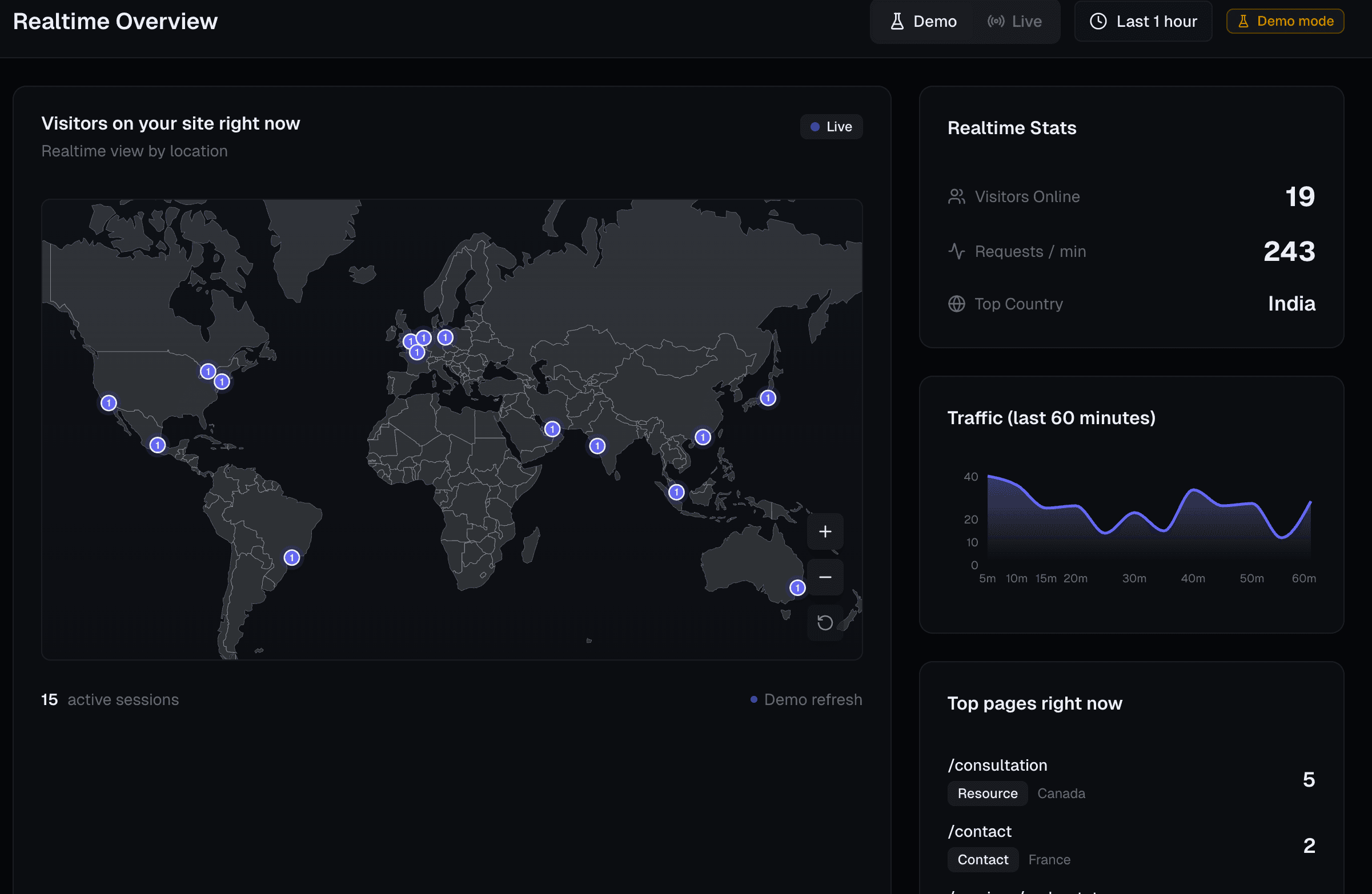
These are the pieces in this repository. The public live demo renders the same overview and realtime layout with sample data. It does not call Clerk, the database, Stripe, or Polar.
- Next.js App Router dashboard with Overview, Realtime, and Docs, plus a collapsible sidebar.
- shadcn/ui cards, buttons, badges, tabs, alerts, and menus. Charts are Recharts inside those cards.
- TrackingComponent for pageview and time-spent events, with a public POST ingest route.
- Drizzle schema for sessions, customers, and journey events. Point it at Supabase Postgres.
- Three data modes: demo data in development, a live in-memory session store, and Postgres.
- Optional Stripe revenue, MRR, and visitor cards. Stripe is not used to buy the template.
- Full TypeScript source, lifetime updates, and use in unlimited projects.
Supabase Postgres through Drizzle
There is no @supabase/supabase-js dependency, no Supabase Auth, and no Supabase Realtime channel. getDb() in lib/db/client.ts loads postgres and drizzle-orm/postgres-js. It reads POSTGRES_URL, then DATABASE_URL, and returns null when both are missing so a static build does not open a connection. The client sets prepare: false, max: 1, an idle timeout of 20 seconds, and a connect timeout of 10 seconds. prepare: false is what a transaction-mode pooler needs, including Supabase’s pooler, Neon’s pooler, and PgBouncer.
drizzle.config.ts points Drizzle Kit at lib/db/schema.ts and reads DATABASE_URL only. Apply the tables with bun run db:push, or bun run db:generate and bun run db:migrate. The schema file does not declare Row Level Security. If you enable RLS in the Supabase dashboard, the role in that connection string needs access to these tables. Postgres mode fetches GET /api/datalighthouse/analytics, which calls getAnalyticsSummary. That query counts distinct visitors and sessions on dl_user_sessions and groups a daily trend with date_trunc. The route returns 401 without a Clerk session.
dl_user_sessions- One row per analytics session. session_id is unique. Indexes cover visitor_id, site_id, and last_seen. Columns include landing page, last page, referrer, country, city, latitude, longitude, device, browser, pageviews, duration, first and last seen, and a jsonb metadata column.
customers- One row per Clerk user (unique on clerk_user_id). Stores email, GitHub username, id, and avatar, billing provider and customer id, checkout and payment ids, amount, currency, status (default checkout_created), and purchased_at. This is the customer record the product listing calls the Supabase customer vault.
customer_journey_events- Journey rows unique on clerk user plus event type. Optional customer_id references customers and is set null if that customer row is deleted. Also stores session id and jsonb metadata.
blog_posts- Published pages for this marketing site: slug, page type, title, summary, author, tags, and jsonb content. It is not the analytics fact table.
How shadcn/ui is used
components.json is the shadcn/ui new-york style, with React Server Components enabled, Tailwind CSS variables, and Lucide icons. Primitives live in components/ui. Class names are merged with cn() from lib/utils.ts.
- Cards, buttons, and alerts
- Overview metric cards, the revenue chart, referrer list, and country list use Card. Range switches use Button. A failed Stripe load uses Alert. Realtime lists use Badge.
- Tabs and dropdown menu
- The data-mode control is Tabs with Demo (development only), Live, and Postgres. The time-range control uses Dropdown Menu. The sidebar uses Button for collapse.
- Recharts, not a shadcn chart block
- Revenue vs. visitors is a ComposedChart (bars for succeeded charges, a line for distinct visitors) inside ResponsiveContainer with minWidth 0. The realtime traffic card is an AreaChart. components.json is the new-york style with CSS variables and Lucide icons. There is no components/ui/chart.tsx in this repo.
- World map
- The realtime location view is a zoomable map from react-simple-maps (world-atlas countries-110m) inside a Card. It is an SVG map with zoom controls, not a separate 3D globe package.
Setup
Short path from purchase to a Supabase-backed dashboard. Deeper notes ship in the private repository. The public version is the quickstart. To build the ingest route and the session table yourself, use the self-hosted Next.js analytics guide.
Step 1
Get the source
Open checkout, sign in with GitHub, and pay $59 on Polar. Accept the collaborator invite and clone the private repository. The quickstart is the public setup overview.
Step 2
Point Drizzle at Supabase Postgres
Set
DATABASE_URLto the Supabase Postgres connection string. The runtime client also acceptsPOSTGRES_URLand checks that name first.prepare: falseis already set, which is what Supabase’s transaction pooler requires. Add the Clerk publishable and secret keys for sign-in.Step 3
Apply the schema and track a page
Run
bun run db:push(or generate, then migrate).drizzle.config.tsreadsDATABASE_URLonly. PasteTrackingComponentinto the root layout. SetSTRIPE_SECRET_KEYonly if you want the revenue cards. The rest of the public steps are on the quickstart.
Compared with the other results for this query
People searching for a shadcn Next.js Supabase analytics dashboard usually land on a generated app, a public repository, or an admin starter. This table is those categories, not a review of a named third-party product. Standalone analytics apps (Umami, OpenPanel, Rybbit, and others) are on the best Next.js analytics dashboard templates page. Stripe card definitions are on the Next.js Stripe analytics dashboard page.
| Approach | What you get | Database and auth | When it fits |
|---|---|---|---|
| Data Lighthouse | Fixed Next.js source: shadcn/ui dashboard, Drizzle schema, Clerk, optional Stripe, and a tracking component. | Postgres through Drizzle. A Supabase database URL works, including the transaction pooler. No Supabase client and no Supabase Auth. | Buy this when you want that stack already wired. $59 once. You host the app and the database. |
| Free GitHub repositories | Public code you clone with no license fee. Many “Supabase dashboard” repos are admin scaffolds or partial analytics apps. | Whatever that repository chose. You maintain the schema, auth, and charts. | Choose a free repo when you want to assemble the tracker and the UI yourself. This page does not score individual repositories. |
| Prompt generators (Lovable-style) | A new Next.js project emitted from a prompt. Tables, auth, and charts are whatever that generation produced. | Depends on that generation. If the output uses the Supabase client or Supabase Auth, that is a different data layer from this repository. Read the generated tables before you trust the numbers. | Useful while the product shape is still changing. This template is the opposite: the schema and charts above are the ones in the repository. |
| Admin boilerplates | A sidebar, tables, and charts filled with sample rows. The shadcn/ui dashboard block is the free example of this category. | Sample data. No TrackingComponent, no dl_user_sessions, and no Stripe revenue route. | Copy one when you will build the data layer. Use Data Lighthouse when the shell should already be an analytics dashboard. |
$59 once, then you host it
One-time purchase of a self-hosted Next.js template. Full source, lifetime updates, and use in unlimited projects. Supabase, or any other Postgres host, is your bill. 7-day no-questions refund.
Quickstart · Stripe revenue cards · Compare Next.js analytics dashboards · Build the dashboard yourself
Supabase and shadcn dashboard FAQ
Short answers for the shadcn Next.js Supabase analytics dashboard template.
Is this a shadcn Next.js Supabase analytics dashboard template?
Data Lighthouse is a self-hosted Next.js and TypeScript template. The dashboard is built with shadcn/ui (new-york style) and Recharts. Session and customer rows are Postgres tables defined with Drizzle ORM. Set DATABASE_URL to a Supabase Postgres connection string, including Supabase's transaction pooler. The license is $59 once. The repository does not include the Supabase JavaScript client.
Does the template use Supabase Auth or supabase-js?
No. package.json has no @supabase/supabase-js dependency. Sign-in is Clerk with GitHub OAuth. The database client is the postgres package with drizzle-orm/postgres-js. getDb() reads POSTGRES_URL, then DATABASE_URL, and sets prepare: false so a transaction pooler such as Supabase's pooler can run the queries.
Which tables does the Drizzle schema define?
lib/db/schema.ts defines dl_user_sessions (one row per analytics session, unique on session_id), customers (Clerk user, GitHub profile, and billing ids), customer_journey_events, and blog_posts. drizzle.config.ts reads DATABASE_URL. Apply it with bun run db:push or the generate and migrate scripts. The schema file does not enable Row Level Security.
Which shadcn/ui components and charts are included?
The dashboard uses the shadcn/ui Button, Card, Alert, Badge, Tabs, and Dropdown Menu. The overview chart is a Recharts ComposedChart titled Revenue vs. visitors, with 7, 14, and 30 day ranges. The realtime page uses a Recharts area chart and a zoomable world map from react-simple-maps inside a Card. This repo does not include a shadcn Chart component.
How do I connect it to Supabase and open the dashboard?
After checkout, set the Clerk keys and set DATABASE_URL to your Supabase Postgres URL. Apply the Drizzle schema, then add TrackingComponent to the root layout. STRIPE_SECRET_KEY is optional and only feeds the revenue cards. Public setup steps are on the quickstart page. The live demo at https://datalighthouse.dev/demo uses sample data and does not call Supabase, Clerk, Stripe, or Polar.
How is this different from a free GitHub repo, a prompt generator, or an admin boilerplate?
A free repository is the right start when you want to assemble the tracker, schema, and charts yourself. A prompt generator can emit a new Next.js and Supabase project, and you still have to check that the generated tables and charts match the analytics you need. An admin boilerplate, including the shadcn/ui dashboard block, gives you layout and sample data, not this session table or the Stripe revenue route. Data Lighthouse is the $59 source described on this page, which you deploy yourself.
What does the $59 license include, and can I get a refund?
One-time purchase of the source, with lifetime updates and use in unlimited projects. Hosting and your Supabase Postgres project are a separate bill. Checkout uses Polar after GitHub sign-in. Stripe is not the processor for the license. The refund is 7 days, no questions, requested through the purchase contact on the contact page.