Self-hosted template · $59 once
Next.js Stripe analytics dashboard template
STRIPE_SECRET_KEY on the app you deploy. Buying this template uses Polar, not Stripe.7-day no-questions refund. If the template is not a fit, request it within 7 days through the purchase contact on the contact page.
What the overview shows
These are the cards on the signed-in overview. Revenue numbers come from your Stripe account. Traffic numbers come from the tracking component in your Next.js app.
- Revenue (7, 14, or 30 days)
- Sum of succeeded Stripe charges in the selected window, in dollars, plus the percent change versus the previous window of the same length. The revenue API requests up to 100 charges for the current window and 100 for the previous one.
- Average daily revenue
- That revenue total divided by the number of days in the range.
- Monthly recurring revenue
- Sum of unit_amount on items of up to 100 active subscriptions, converted from cents. The current code does not divide a yearly price by 12, and the overview does not show an MRR percent change.
- Visitor conversion rate
- Shown after Postgres customer tables are configured. It is distinct checkout completions (or paid customers, whichever count is higher) divided by distinct signed-in users in the window. It is not divided by anonymous visitors. Without the database the card says “Configure Drizzle”.
- Visitors online
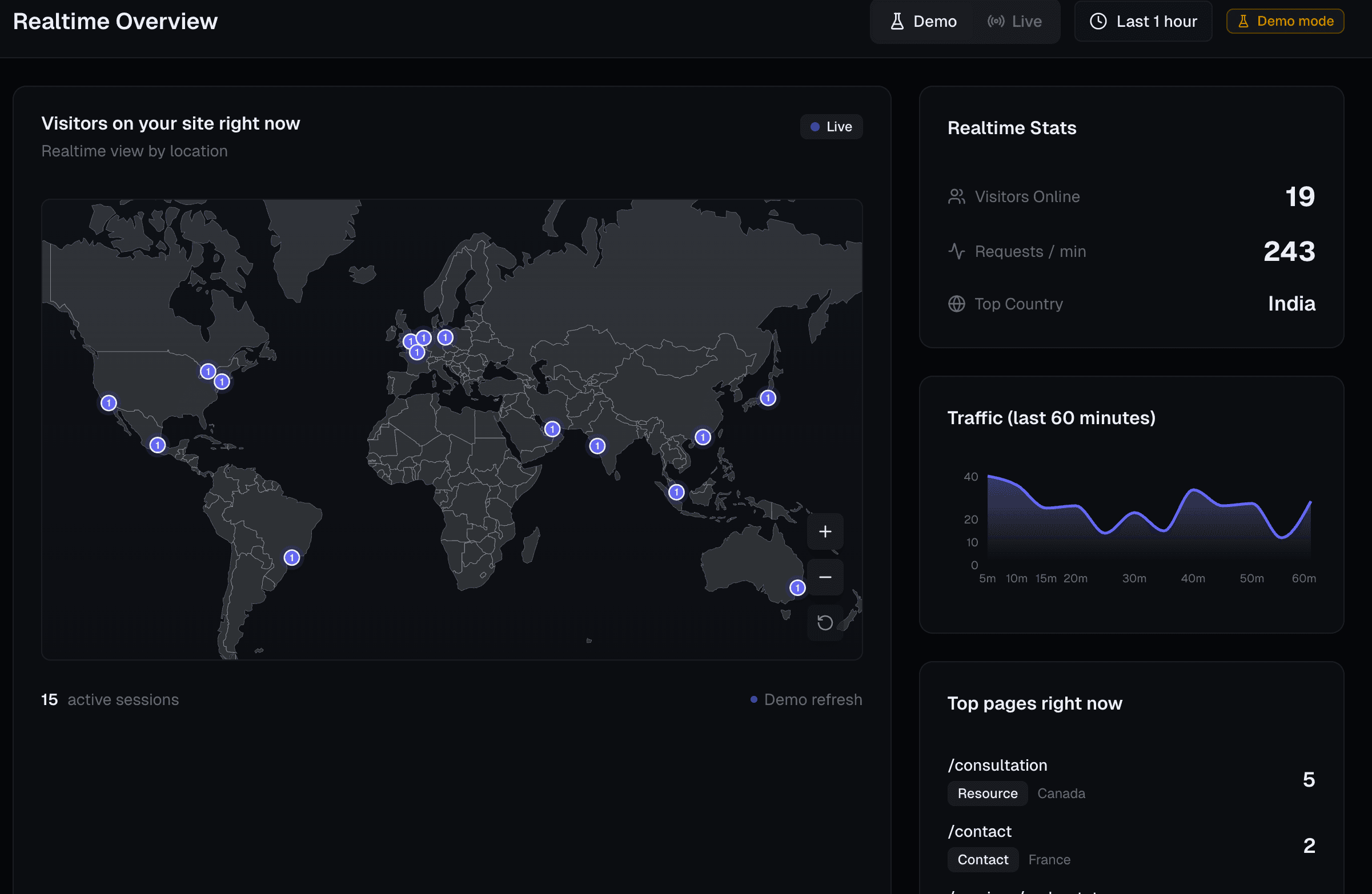
- Live count from the template’s own session tracker, not from Stripe.
The chart is titled “Revenue vs. visitors.” Revenue bars are daily succeeded Stripe charges. On the signed-in overview, the visitor line is generated from that revenue series in the current template. It is not a join to measured sessions. Referrer and country tables use tracked sessions. The public demo uses a fixed sample so you can see the same layout before paying.
Dashboard preview
The embed below is the same overview component as the live demo. Switch 7D, 14D, and 30D to change the sample series. The screenshot is the realtime view from the marketing site.
Sample data from the public demo. These figures are not from a Stripe account.
$11,286
$376.20
30-day average
$4,533
2.6%
114 purchases • 464 checkout starts
23
Revenue vs. visitors
Sample revenue and visitors for the last 30 days.
Highest revenue day: Thursday, October 1, 2026 with $495.00
Top referrers
Where your recent traffic is coming from.
Top countries
Audience distribution by location.
How Stripe hooks in
- Add
STRIPE_SECRET_KEYto the environment of the Next.js app you deploy. The key is read only by the revenue API on that app. - A signed-in user opens the overview. The page calls
GET /api/datalighthouse/revenue?days=7|14|30. That route requires a Clerk session. - The route uses the Stripe Node SDK to list succeeded charges in the window and active subscriptions. Amounts are stored in cents and shown in dollars.
- If the key is missing, the API returns an error and the overview says it could not load Stripe revenue. Traffic cards still use the template’s tracker.
Checkout on datalighthouse.dev is Polar. Stripe is not the processor for the $59 license. It is only the optional revenue source inside your copy of the dashboard. The quickstart states the same split.
Setup
Most teams add tracking in a few minutes after the source is in their app. Deeper notes ship in the private repository after purchase.
Step 1
Add the Tracking Component
Paste one component into your app layout and you are live.
Step 2
Connect Stripe (Optional)
Drop in your Stripe keys to unlock revenue and MRR insights.
Step 3
Open the Dashboard
See real-time sessions and trends instantly.
import { TrackingComponent } from "@/components/data-lighthouse/tracking-component"

export default function RootLayout({ children }) {
  return (
    <html>
      <body>
        <TrackingComponent />
        {children}
      </body>
    </html>
  )
}
$59 once, then you host it
One-time purchase of a self-hosted Next.js template. Full source, lifetime updates, and use in unlimited projects.
- Full Next.js + TypeScript source code
- Real-time analytics with 3D globe
- Stripe revenue dashboard
- Supabase customer vault setup
- Automated GitHub repo invites
- Lifetime updates
- Developer documentation
- Use in unlimited projects
Compare it with other Next.js analytics dashboards · Analytics tool comparisons · Alternatives
Stripe dashboard FAQ
Short answers for the Next.js Stripe analytics dashboard template.
What is the Next.js Stripe analytics dashboard template?
Data Lighthouse is a self-hosted Next.js and TypeScript template. The overview shows Stripe revenue, average daily revenue, and monthly recurring revenue beside first-party traffic. The license is $59 once. You deploy the source yourself.
Does buying the template use Stripe?
No. Checkout for the Data Lighthouse license uses Polar after GitHub sign-in. Stripe is optional and only reads revenue inside the dashboard you host, through STRIPE_SECRET_KEY.
Which revenue metrics does the overview show?
Revenue for 7, 14, or 30 days (succeeded Stripe charges, compared with the previous window), average daily revenue, and monthly recurring revenue from active subscription item prices. A visitor conversion rate appears after Postgres is connected. Visitors online come from the template's own tracker. The revenue API requests up to 100 charges per window and up to 100 active subscriptions. Yearly prices are not divided into a monthly amount.
Is there a live demo?
Yes. https://datalighthouse.dev/demo renders the dashboard with sample data and does not call Stripe, Clerk, Polar, or the database. The template license is still $59.
What is the refund policy?
7-day no-questions refund. Request it within 7 days through the purchase contact on the contact page.